
WhatsApp Business API pricing—whether accessed directly or through Twilio—follows a conversation-based billing model. Instead of charging per individual message, WhatsApp charges for each 24-hour conversation session between a business and a customer. Understanding this model is essential for estimating costs accurately and planning your communication strategy.
What Is a WhatsApp Conversation?
A conversation is a 24-hour messaging window that begins when the first message is sent by the business or when the business replies to a customer.
Inside this window, all messages are free—you pay only for the conversation itself.
Each conversation falls into one of four categories, each with its own price.
1. Marketing Conversations
Marketing conversations include messages that promote your business, products, or services. This category covers:
- Promotional broadcasts
- Offers and discounts
- Product announcements
- Re-engagement messages
- Newsletters via WhatsApp templates
Marketing conversations are typically the most expensive category because they are considered high-value outreach.
2. Utility Conversations
Utility conversations focus on customer support and post-purchase activities. These include:
- Order confirmations
- Shipping updates
- Payment reminders
- Appointment schedules or changes
- Account-related alerts
These messages are functional and transactional, typically more affordable than marketing conversations.
3. Authentication Conversations
Authentication conversations are used exclusively for sensitive verification processes such as:
- One-time passwords (OTPs)
- Login verifications
- Multi-factor authentication
Only templates approved under the “Authentication” category can be used in this type of conversation.
4. Service Conversations
Service conversations begin when a customer sends your business a message, and you reply within 24 hours. Examples include:
- Customer queries
- Support requests
- Assistance with ongoing issues
Service conversations are generally the least expensive because they are user-initiated.
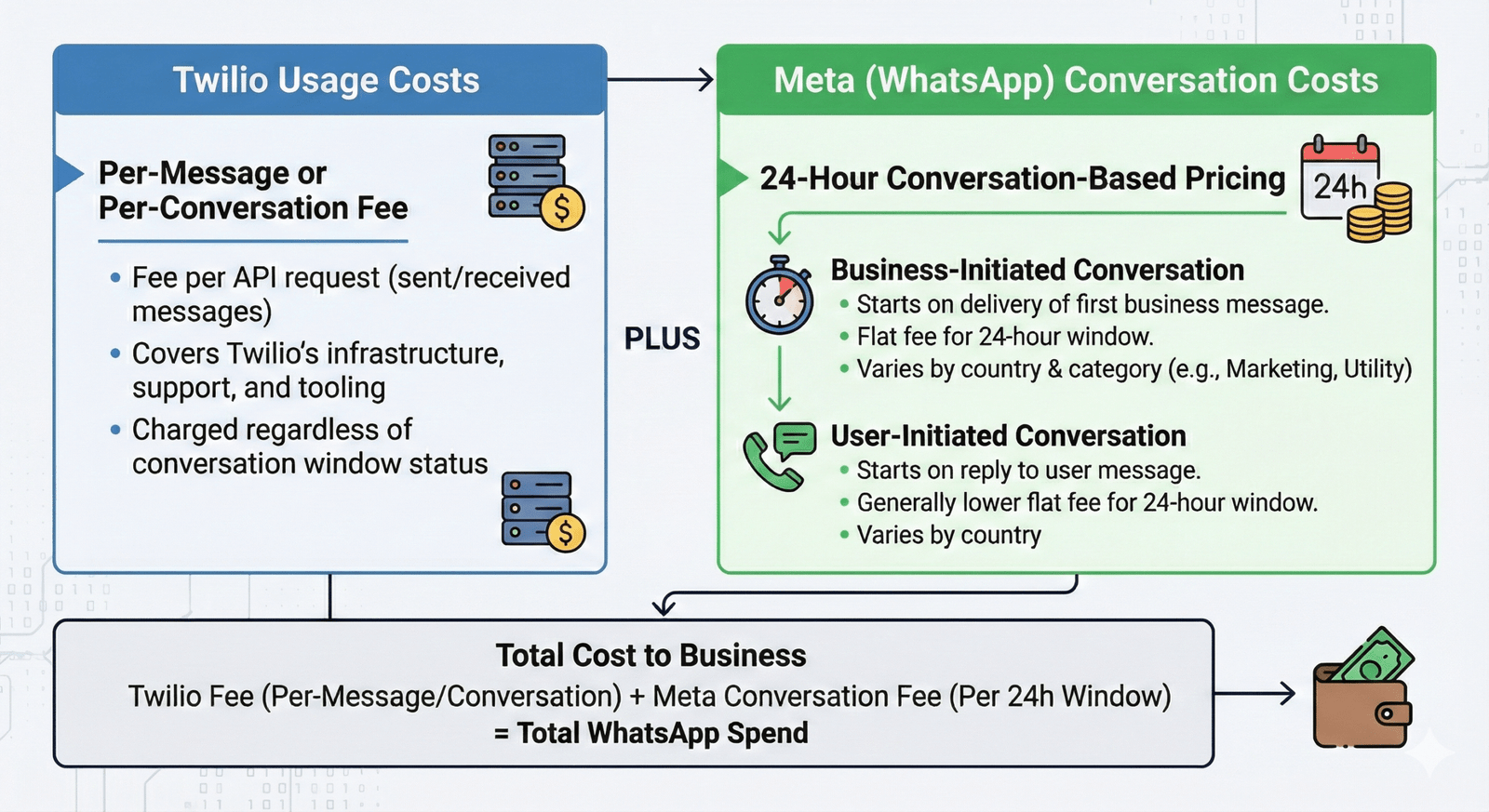
How Billing Actually Works
When You Send a Template First
If your business sends the first message using a WhatsApp template, the cost is based on the category of that template.
This starts a 24-hour conversation window.
When the User Messages You First
If a customer contacts your business and you reply within 24 hours, a service conversation begins.
Using Multiple Categories in One Window
If you trigger a different template category during the same 24-hour window, WhatsApp will start a new conversation and charge again based on that category.
Twilio Fees You Should Know
When using Twilio for WhatsApp, you should expect:
1. Twilio Number Fee
A small monthly fee for the phone number connected to WhatsApp.
2. WhatsApp Conversation Fees
The main billing component, charged per conversation.
3. Template Approval
Template creation is free, but each template must be reviewed and approved before use.
Twilio does not charge extra per message inside the conversation window.
Example of How Costs Add Up
Here’s how cost estimation works conceptually (example only):
- 1,000 authentication/OTP messages → priced as 1,000 authentication conversations
- 1,000 shipping updates → priced as 1,000 utility conversations
- 2,000 broadcast promotions → priced as 2,000 marketing conversations
Each conversation category uses its own rate.
Key Takeaways
- WhatsApp charges per 24-hour conversation, not per message.
- The template category determines the cost for business-initiated messages.
- Service conversations are triggered by user messages.
- You can send unlimited messages inside an active conversation window.
- Twilio adds only small infrastructure fees on top of WhatsApp’s pricing.